Cozi Care
Helping siblings share the care of an aging parent, without one of them turning into the manager
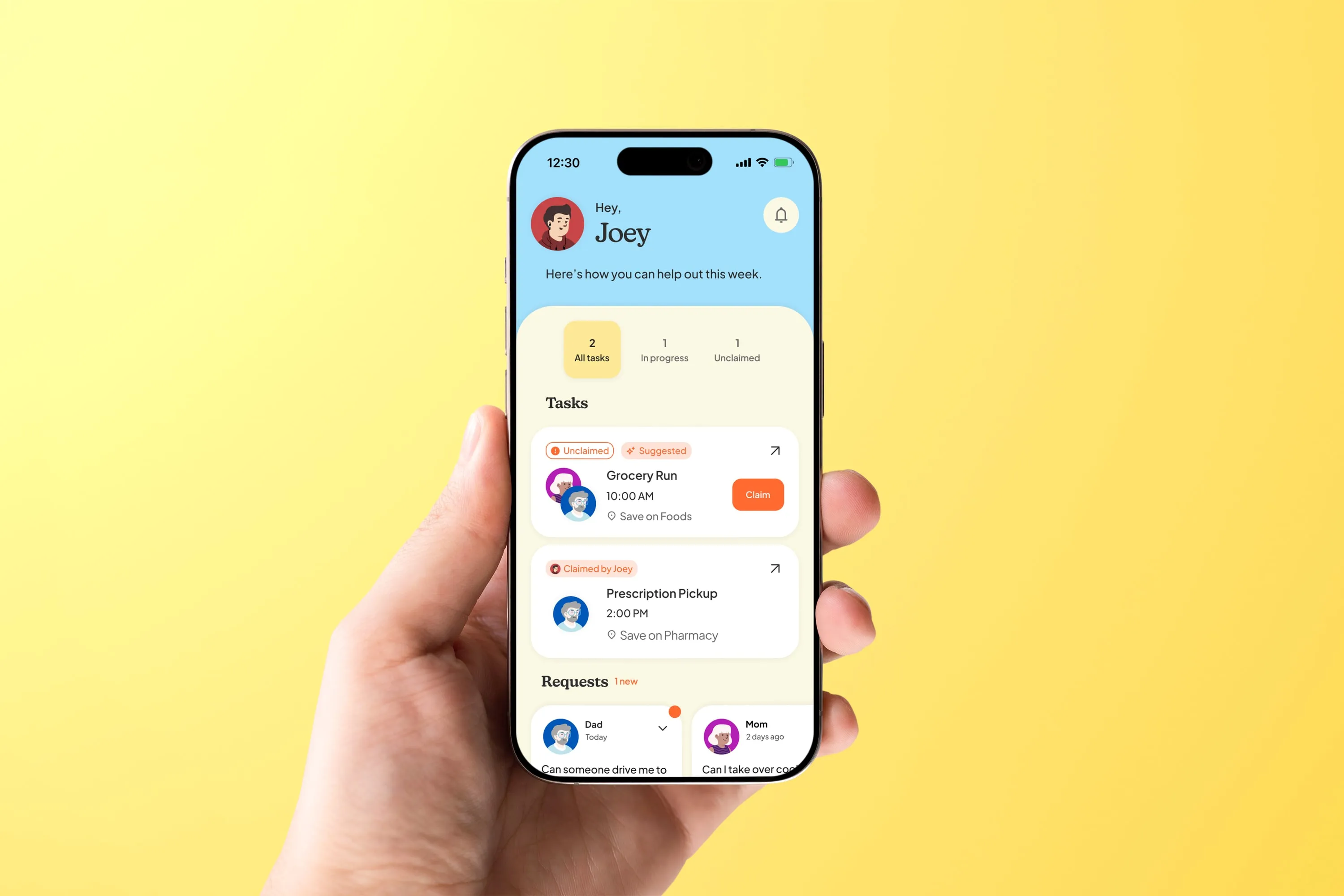
Care for an aging parent usually lands on one sibling by default. Cozi Care is a concept extension of the Cozi family organiser that makes that work visible and helps the family share it. On a team of six, I led the UX: the user flows, the case for an AI that suggests who does what, the language, and the working prototype. Teammates led the final visual design. It earned an A and opened the final showcase.
User flows, AI interaction design, UX writing, coded prototype · Figma, FigJam, Claude Code
- Role
- UX design: flows, AI, copy, prototype
- Team
- Six designers
- Timeline
- Six weeks, summer 2026
- Context
- Concept, SFU course project (IAT 438)
/1Nobody decides who becomes the caregiver
When parents start needing help, it usually falls to one adult child: whoever lives closest, or seems most capable. Nobody ever talks it through. The heaviest part isn’t the errands. It’s the running list of appointments, refills and check-ins that lives in one person’s head, plus the awkwardness of asking siblings for help again and again.
Most caregiving apps organise information. That makes the load visible, but someone still has to hand the work out. The primary caregiver ends up with one more thing to manage.
“It’s carrying hundreds of changing details in my head every day.”
- 2–3%
- of families split the care of a parent equally.
- Home Instead, 2011
- 86%
- of unpaid caregivers in Canada say it has hurt their physical or mental health.
- CHPCA, 2026
- 11/180
- senior caregiving apps support shared scheduling between co-caregivers.
- Kaboha et al., 2021
- The leadJoeyLives closest. Became the one everyone calls first, without ever agreeing to it.
- The remote siblingWillWilling to help, but far away, and assumes Joey has it handled.
- The close siblingSandyCould help, but usually hears about a task once it’s too late.
- The parentsMom and DadLiving on their own and still want a say in their care.
/2What I owned
Six of us worked on Cozi Care, and on a course project everyone touches everything. My part was mostly the experience: getting from the problem to a solution, and how the app behaves and talks. Teammates led the final layouts, visual design and identity. These were the parts I led.
- The user flows. Every path from building the care circle to creating, suggesting and claiming a task, and the setup that feeds them.
- The early structure. Much of the early wireframing and the first visual mock-ups, which set how the dashboard and setup are laid out.
- How the AI behaves. I pushed for AI when part of the team wanted none, then worked out how it could suggest without taking over.
- The language (co-written). Copy that sounds like asking a sibling for help, not like a project manager, and never judges who did what.
- The working prototype (co-built). Built in Claude Code from the team’s Figma screens, with the micro-interactions and animations.
The brief asked us to find a problem, get it approved, and solve it with an existing brand that made sense. We chose Cozi because the hardest part of any caregiving tool is getting a family onto it, and Cozi families already share a calendar and lists. We had six weeks, a critique every week, and one week for interviews and testing with 5 to 10 caregivers from our own circles. Our prof is the primary caregiver for his mom, and his feedback shaped the project every week.
The idea
The app does the asking, so nobody in the family has to.
/3Without AI, we were just handing the caregiver more work
Part of our team didn’t want AI at all, and our prof and some interviewees were wary of it. How would it know a family’s context? Would it start running the family? My argument was that without it, Cozi Care takes nothing off the primary caregiver. They would still create every task, decide who should do it and chase people up. Assigning care is work in itself. When one sibling has to nag the others, it wears down the relationships the app is meant to protect.
The first version went too far the other way. It sorted the tasks and handed each person their share, ticked and final. That was exactly what people were worried about, so I reworked it around three rules.
- It suggests from what the family said. Each person’s comfort with different tasks, their availability and how close they live, all entered in setup.
- It says why. Every suggestion shows the reason it landed with you: “You live closest to the store. You’re free Tuesday morning.”
- Claiming stays a choice. “Not the right fit? That’s okay.” A task can be reassigned, done remotely or split, so the shop goes to Joey and writing the list goes to Will, who lives further away.
“Without AI, we’d just be handing the busiest person in the family one more thing to manage.”
Before · Sprint wireframe
After · Final prototype
What changed
- 1Ticked for you. Every task arrived already assigned.
- 2Matched on “strength”, with no reason anyone could see.
- 3Locked in at the end of setup, with no way to say no.
AfterThe app suggests, says why, and makes saying no easy: reassign it, do it remotely, or split it.
/4Setup pays for every suggestion
Those rules only work if the app knows something real about each person. So setup carries the weight, and all of it comes before the family gets anything back. Setup was my flow, and I tried to keep its cost low and shared.
- Everyone fills in their own. Comfort and availability come from each sibling, so the coordinator doesn’t have to guess for them.
- Plain words. Needs can be typed the way you’d say them, and the app sorts them.
- Reassuring copy. “Rough estimate is fine… we’ll never book you without permission.”
- Nothing locks in early. A final “Does this all look right?” screen comes before anything is set, and after that, availability is one tap from the dashboard.
Setup, sped up
/5Mom isn’t a task on the list
The first setup asked, “What are the main necessities of the person needing care?” Our prof pointed out that it felt impersonal, and he asked how much say the parent gets. His own mom is very independent. She wants to know who’s coming and when, to ask for a visit, and sometimes to turn help down because she’d rather cook dinner herself.
That changed the flow. Setup now asks “Who are you caring for?”, what Mom usually needs help with, and how involved each parent wants to be. Parents who are comfortable on a phone get their own simple view, with bigger text and just two tabs. Their reminders say who is coming and why, and they can make requests by voice. Those requests land on the siblings’ dashboard with a yes or no, so they don’t have to go through a phone call first.
Before · Sprint wireframe
After · Final prototype
What changed
- 1“The person needing care.” Our prof called it impersonal.
- 2The coordinator picks the needs. The parent is never asked.
- 3Three quick steps, all filled in by one person.
AfterSetup starts with “Who are you caring for?” and asks how involved each parent wants to be.
Mom’s view
Joey’s view
“My mom wants to know who’s coming and when. And some nights, she’d rather cook dinner herself.”
/6We stopped keeping score
40–46%of caregivers say poor communication between siblings is the main driver of resentment.Home Instead, 2011
An early care summary charted each sibling’s workload and warned when one person was carrying 60% of it. It was meant to surface uneven load, but it turned the family into a scoreboard. Someone ends up feeling guilty, and someone else feels better than the rest.
We replaced it with a one-tap daily mood check. When someone’s trend dips, the app says so (“Sandy has been feeling down”) and offers two things to do. You can give her a call, or take a task off her plate, which opens her week so you can claim one. It tracks how people feel, never who fell behind.
Before · Sprint wireframe
After · Final prototype
What changed
- 1A weekly chart of how much each sibling did.
- 2A warning naming who carries the most. It invites guilt and comparison.
- 3A log of who did what, which reads like a scoreboard.
AfterIt tracks how people feel, and turns a dip into one concrete way to help.
/7What happened
All term, our critiques were among the strongest in the class, mostly because we came back every week with real improvements. The project got an A. Our prof had us present first at the final showcase because he considered it the strongest project.
The alumni judges pushed hard on edge cases: a sibling who ghosts, tasks nobody claims, families who don’t get along. Those are fair questions, and the class had raised some of them weeks earlier. With our prof, we had chosen to solve the core first, for families who want to help but don’t know how to share the work. I’d rather show that choice than pretend the app handles everything.
“What happens when a sibling just stops showing up?”
/8What I’d do next
- Design the failure states. Time-sensitive alerts for unclaimed tasks, and what happens when someone goes quiet.
- Make room beyond the family. A neighbour with a limited view, or a professional caregiver with their own dashboard.
- Test far more widely. One week with people we knew isn’t enough to show the suggestions work outside our own bubble.